
Over the past few months, I have been sharing AI-driven projects to inspire your work. Today’s example is a little different, a little more complex, and requires some context.
Earlier this year, Ii wrote my first novel. Some of you might remember that 5 years ago I wrote a non-fiction business book, Well Made Decisions published through New Degree Press. This novel is something different: a fictional work in a letter writing style from a senior demon to a junior tempter, written for twenty-somethings and those who love them.
The book itself is not an AI project. I wrote it word for word. But I did use AI to plan out the promotion and project management surrounding the release of the book which is scheduled on November 29th in honor of C.S. Lewis’ birthday.
One of the things I developed was a web app that acts as a week-by-week project management tool. Through it, I can keep track of my action items by week and it even communicates between me and the Claude Code session that is helping me with some of the tasks, so I don’t have to log into Claude Code on my phone when I am away from my desk.
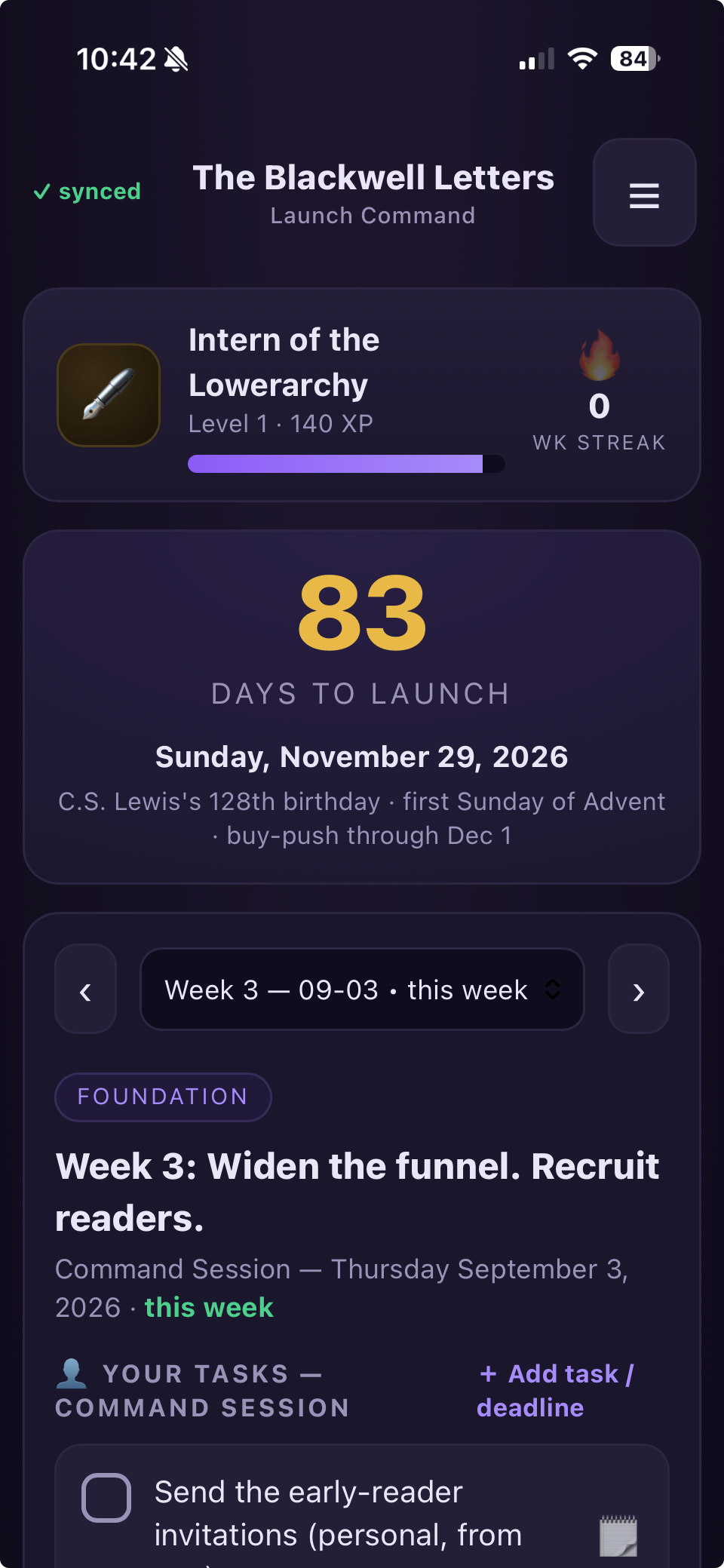
I gamified the experience, earning points for everything I do and earning badges. You will notice that I have achieved “Intern of the Lowerarchy” status with 83 days to go for the launch. I had already created a series of project plans for the different workstreams of the project, so this app provided me a place where all of those could be referenced and prioritized together.
Something like this could be a great tool if you are preparing for an event, launching a large initiative, or wanting to break down a long multi-month process into weekly progress.
Below is a prompt you can adapt to your project. Anytime I mention book launch, color or brand schemas, or the like, you can insert your own details. This first prompt will get you started and then based on what is built, you can tweak and adjust the architecture, the user experience, and the content to what you want to see.
For additional details on the book, visit https://theblackwellletters.com
The prompt
Build me a phone app I can install on my home screen to run my book launch. The book is "The Blackwell Letters," an epistolary-style novel (like C.S. Lewis’ The Screwtape Letters or Mary Shelley’s Frankenstein), and this is my daily command center for a 30-week campaign that ends on launch day, Sunday November 29, 2026 (C.S. Lewis's birthday). Make it look and feel like a polished, real app.
The vibe. Dark and moody to match the book — a near-black plum background with violet, gold, and ember accents, and a little embossed "seal" for a logo. It should feel premium and game-like, not like a spreadsheet. It has to look great on my iPhone first and work cleanly on a computer, too.
Getting in. Protect it with a passcode. I get a password that lets me see and change everything; I can hand out a second, read-only password to friends and my launch team so they can watch progress without editing anything.
It follows me across devices. Whatever I check off or type on my phone should show up on my laptop and in my code session notes, and vice versa. If I'm offline it should still open and work, then catch up when I'm back online. Somewhere small, show me whether it's synced.
A way for us to talk inside the app. I want a spot where questions can be posted to me and I can type answers right there, so the app is how we communicate about the launch day to day. Answered questions should get archived.
Make it a game. Reward me for getting things done: earn points for finishing tasks and clearing a whole week, climb a ranking ladder themed as rising through the demonic "civil service" (start as a lowly intern, and the very top rank breaks the joke and crowns me "Bestselling Author"), and keep a daily streak going. Put a big countdown to launch day front and center.
The main screen — the weekly plan. My 30 weeks of launch work, one week at a time, with easy next/back navigation and today's week showing automatically. Each week is a checklist of small, single-action tasks. Mark clearly which tasks only I can do (calls, recording video, hitting publish, anything that needs me to log in) versus what's being handled automatically. Let me add my own tasks, check things off, and attach a note to any task (text, a link, or a picture) so finished work can point me to where to go look.
Outreach trackers. Separate lists for Bookstores, Podcasts, Endorsers, and “fans of the genre” communities. Each contact shows who they are, where, how to reach them, and a status I can move along a pipeline (like To research → To pitch → Pitched → Follow-up → Confirmed). Let me keep notes on each one, and let me add, edit, and quote endorsers directly.
A scoreboard. Track the numbers that matter — Amazon reviews, team members, bulk sales commitments, speaking pitches sent and dates confirmed — each with a goal to fill toward. Add a "copies sold" progress thermometer with milestone markers (launch week, bestseller goal, and fun stretch rewards like a trip). Sales goals should come from my sales reports, not be typed in by hand.
A few practical touches. Make it easy to edit the weeks, tasks, contacts, and goals later without breaking anything.